

Title, author and book details
Your work's title, author, language, rights and credits, plus the ISBN, the publisher and everything else bookstores ask for; they appear on the cover, in the exported book and when you read it. · 3 min read
You change your work's details in Work → Properties, or in File → Work properties.
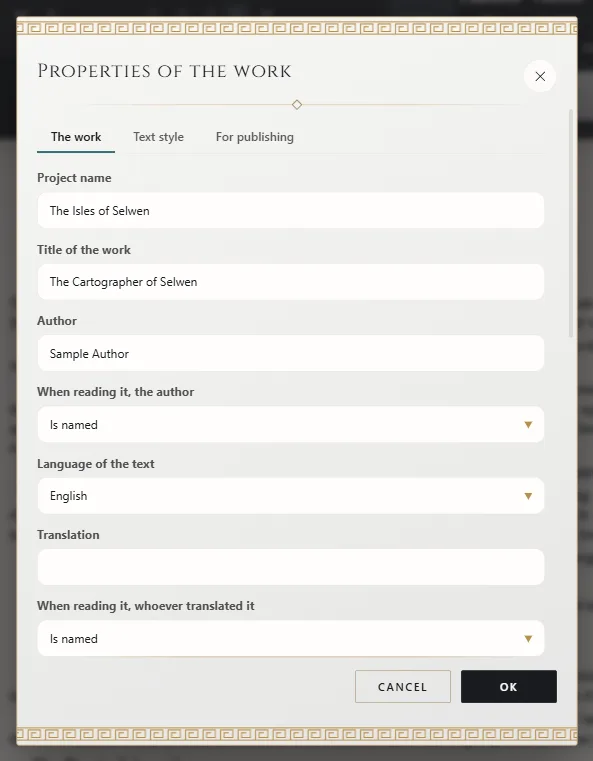
The dialog has two tabs: The work, with what belongs to your work, and For publishing, with what a bookstore or a printer asks for.
Title and author
- Title of the work and Author: the ones that appear on the cover, on the title page and in the details of the exported book.
- When reading it, the author: if you choose to stay anonymous, your name isn't published, although the work is still yours.
- Project name: the name you see the project under in Exaratio. It can be different from the title.
In a series, each book has its own title and author.
The language
Language of the text: the language the work is written in. Exaratio detects it on its own; change it if you write in another one. Exaratio uses it to recognize your characters' names in the text (Aliases: one character, many names). The exported book declares it too, so every reading device treats it in its language.
Translation and credits
- Translation: who translated it, if it's a translation. As with the author, you can choose to keep them anonymous when it's read.
- Contributions (one per line: “Name — role”; “(anonymous)” at the end to leave them unnamed): one person per line, with their role: “Anna Reed — copyediting”, “Luke Parker — illustrations”.
Image credits are written in the image library (Images in the text), and font credits come with each font.
Rights and license
In Rights of the work, choose whether the work is protected or free. If it's free, choose its License, if free: public domain or one of the Creative Commons licenses, and Exaratio adds the link for you. If you use a different one, choose Other (write it below) and write its name and where to read it.
The synopsis
A book's synopsis is written on its sheet: open the book in the manuscript, click Work → Sheet and fill in Synopsis.
For publishing: ISBN, publisher and the rest
On the For publishing tab you write what goes with the book in bookstores:
- Subtitle.
- Series or collection and The book's number in the series. In a series of several books, if you leave them empty, the project's name and the book's place in the series are used.
- Publisher and ISBN. Exaratio checks that the ISBN is written correctly.
- Publication date: the year, the year and month, or the day.
- Description for bookstores: if you leave it empty, the synopsis from the book's sheet is used.
- Keywords (separated by commas).
All of this travels inside the EPUB, the Kindle file and the PDF you export (Export: formats and options), and you can put it on the cover as a detail that updates itself (The cover and the title page). Whatever you leave empty doesn't appear anywhere. In a series, each book has its own.
Exaratio 0.9 · revision 2 · October 17, 2026