

Campaigns for social media
Exaratio proposes ads for Instagram, X and the other networks, made with what your book already has —its cover, its quotes, its characters— and checked so they can be read; you choose one, touch it up if you like and save it as an image. · 3 min read
A campaign brings together the ads for one moment of your book —the launch, a presale— and an ad is an image made to measure for a specific slot on a network: the Instagram post, its story, the X header. Exaratio doesn't publish anything: it gives you the file, and you upload it wherever you want.
Open it with Work → Campaigns, or with Campaigns in the menu.
The proposals
You don't need to know about design. Click Proposals and Exaratio puts together a gallery of ads with your book's material: the cover's palette, lines your characters say, their portraits, the period images and the book in three dimensions. Each proposal follows a recipe, the shape of a professional ad: the scene from the book, the editorial quote, the character, the first line…
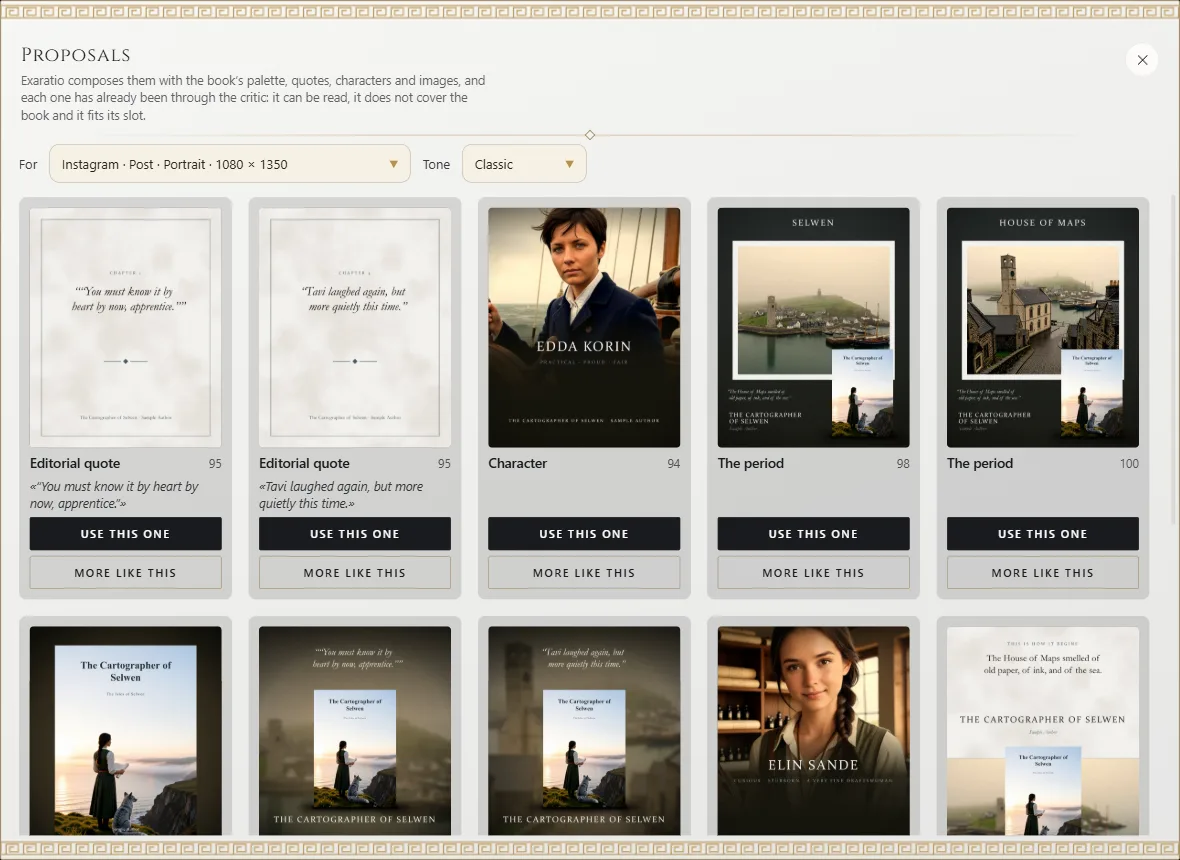
They all go first through a critic that looks at what a designer would look at: that the texts fit in the area the network doesn't cover, that they don't overlap, that they don't cover the book or a face, that they can be read on a phone and that they have contrast. Whatever doesn't pass never reaches the gallery; whatever can be fixed —a scrim under a quote that couldn't be read— arrives fixed. The number on each proposal is its score, from 0 to 100.
At the top you choose what it's for (the network and the slot) and the campaign's tone, which decides the font pairings: classic, romantic, dark, fantasy, science fiction, young adult or contemporary. It starts from your work's visual style, and you can try another one without losing anything.
On each proposal:
- Use this one: the ad goes into the campaign and opens so you can see it and touch it up. If you didn't have a campaign yet, one is created.
- More like this: the same recipe with another quote, another character or another image.
- Whole campaign like this: the same recipe and the same material in every ad of the campaign, each one made to its own size.
Nothing the reader hasn't read yet
The quotes in the proposals come from the first part of the book, so that an ad doesn't tell what the reader doesn't know yet. If you want others, ask your assistant (What your assistant can do, and when it asks you): it can pin the quotes from the book that you prefer, discard the ones you don't, or write original texts for the campaign.
Touch up an ad
The ad you chose opens in the composer, the same editor as the cover in a different role (The cover and the title page): layers, texts, images and the 3D book, which you turn by dragging it. The guides mark the slot's safe zone. View shows you the ad rendered as it will come out, with its file size; Save image saves it as an image and Take to other networks makes copies for other slots.
The art direction
When you choose the first proposal, the campaign keeps its art direction: that proposal's fonts. That way all its ads look as if made by the same hand. If you try another tone in the gallery and use a proposal with it, the campaign adopts it, and the ads that came from a proposal are remade with the new tone; the ones you composed by hand aren't touched. Everything can be undone with Ctrl+Z⌘Z.
Exaratio 0.9 · revision 1 · October 27, 2026