

Additional languages and modules
Download other languages for Exaratio, plus sound, ambience, theme and paper modules, without leaving the app. · 2 min read
Other languages
Your installer comes with the language you downloaded it in. To use Exaratio in another one:
- Choose Tools → Preferences.
- Next to the language, click Search exaratio.com.
- Choose the language and confirm. It downloads and Exaratio switches language right away.
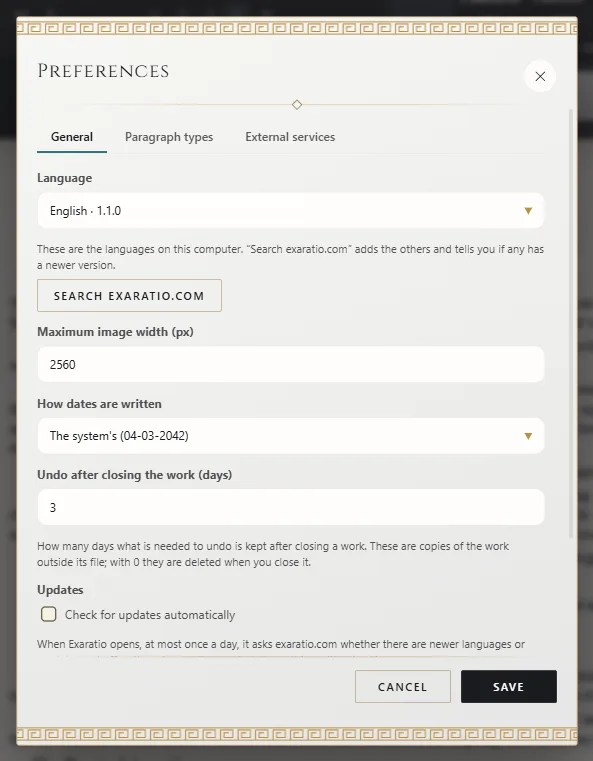
More in Change Exaratio's language.
Modules
Modules dress up your writing: the sound of the keys, themes, the paper, a background ambience, the scene entrance when you open the work, and genres that bring several of those things designed to go together. They're only sounds and data, never a program.
Open them from View → Customization, or Tools → Customization. Each type has its own tab.
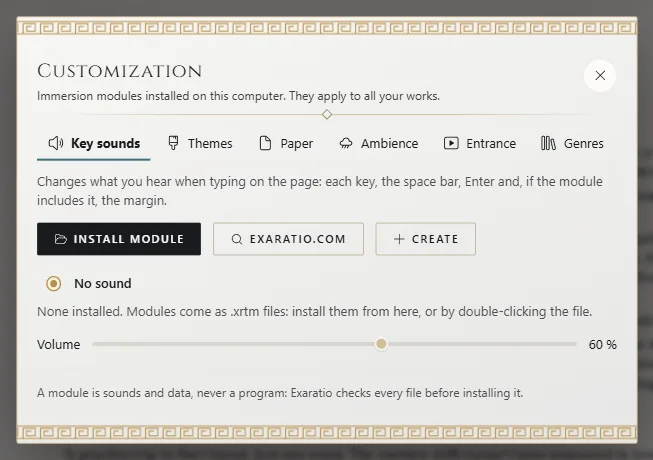
- Install module: for a
.xrtmfile you already have. You can also double-click it or drop it onto the window. - exaratio.com: opens the exaratio.com module catalog, each one with its preview. Your computer needs to be activated, and each one counts as a download on your account.
- Create: make your own module, signed with your account, to use or share.
Before installing, Exaratio shows you the module: who signed it, its version and its license. Only signed modules can be installed: if one isn't, Exaratio tells you why it can't install it. Choose one from the list to use it, click Try to hear it, or Uninstall to remove it.
Keep them up to date
Help → Check for updates looks for new versions of your languages and modules, and tells you if there's a new version of Exaratio. If you want it to do this automatically when Exaratio opens, check Check for updates automatically in Preferences. It never installs anything without asking you.
If a language or module you downloaded from exaratio.com can no longer be used, Exaratio fetches it again from exaratio.com on its own the next time you open Exaratio.
Exaratio 0.9 · revision 2 · October 17, 2026