

Rate a work, anonymously
When you finish a book you can tell its author what you thought of it, without them knowing who you are. And if you write, this is how you open your work to ratings. · 3 min read
When you finish reading a book, its author can ask you what you thought of it. Your answer reaches them added to those of other readers, never with your name.
If you read: rate a work
When you reach the end, the summary of your reading (Your reading, in numbers) asks you What did you think?. The survey opens if three things are true:
- Its author wanted it to be rated. If not, it doesn't appear.
- You finished the book.
- You read all of it, without skipping stretches. If you skipped something, the survey appears grayed out and tells you how much: go back to those stretches —the thread of your reading points them out to you (Move through the book)— and you'll be able to rate it.
Answer whatever you like: the questions its author chose —Overall, The writing, The plot…—, from one to five, and what genre you'd say it is. About you (optional) —your age, your gender, your country— is used only for statistics. You can also write a few words about the book: those stay with you and never travel.
Click Save my opinion: your opinion is saved on your computer.
Share it with its author
For your rating to count, click Share. You need a free exaratio.com account, connected just once from your browser with Connect with exaratio.com.
Before sending anything, Exaratio shows you exactly what will travel: your answers, without your name, your account or your computer. For 30 days you can change it; after that it stays fixed.
Your anonymity
exaratio.com checks that whoever rates has an account and read the whole book, but it's built so that it can't know who they are: each work knows you by a different name, and its author only sees totals. No group of fewer than five readers is shown, so no one can recognize you.
If you write: your work's ratings
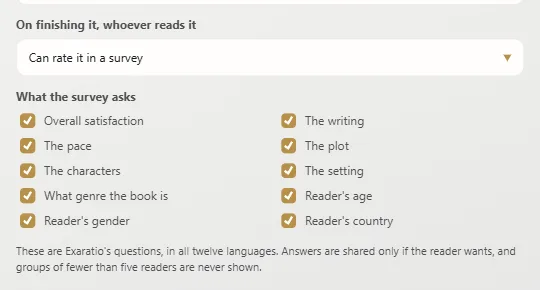
- Open File → Work properties and, in On finishing it, whoever reads it, choose Can rate it in a survey. In What the survey asks check which questions the survey will ask them: they're Exaratio's own, in the twelve languages.
- Choose Work → Work ratings and click Register on exaratio.com. This computer must be activated with your license and the work must be signed with your account (How a work is protected).
- Save the work after registering it, and share that copy: whoever reads all of it will be able to rate it. Copies saved before you registered it can't be rated.
In Work ratings you'll see How they score it and What genre they say it is. Results appear once there are five ratings, and never a smaller group, so that no reader can be recognized. What each reader wrote in their own words doesn't reach you: it's theirs.
Exaratio 0.9 · revision 1 · October 17, 2026