

Dating scenes: time inside the text
Set the date each scene takes place; Exaratio uses it to show you each character's age, portrait and what they know at that moment. · 2 min read
Dating a scene tells Exaratio when it happens. From that point on, everything you write takes that date, until the next mark.
Date from a line
- Put the cursor on the line where the scene begins.
- Press Ctrl+Shift+4⌃⇧4, or choose Insert → Date from here.
- Type the date and accept. Below the field you'll see examples of how to write it in your timeline's calendar (Historical calendars and your own calendars).
A band with the date appears in the margin, covering the whole scene. Double-click it to change it.
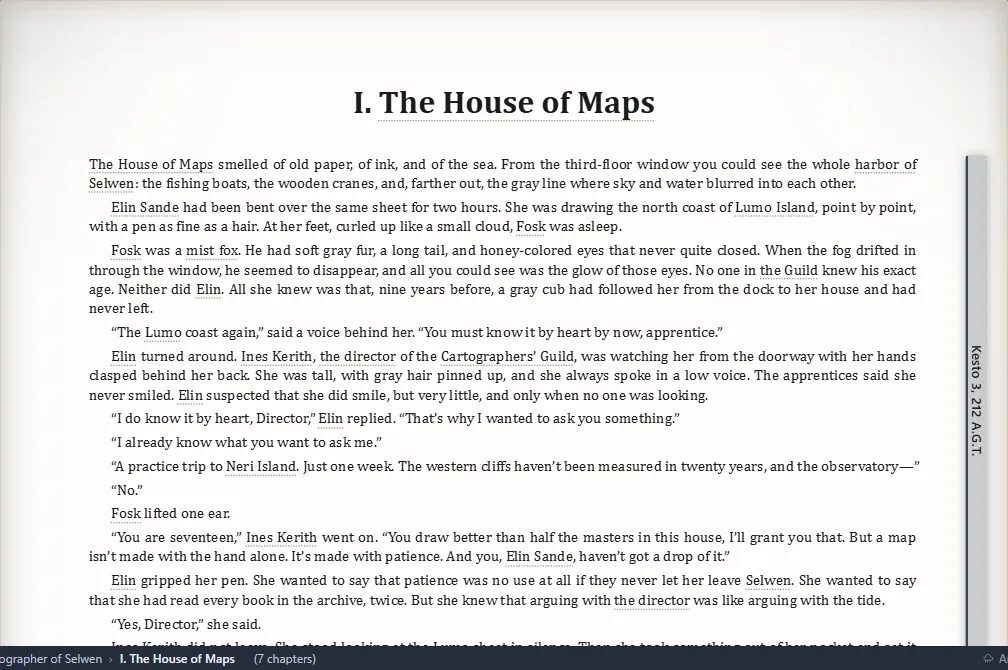
Date just a passage
For a memory or a flashback in the middle of a scene, select that passage and press Ctrl+Shift+4⌃⇧4, or right-click → Date the selection. The passage takes place on the date you type, and the text that follows goes back to the date it had before.
Move on to the next day
To move forward without typing dates:
- Ctrl+1⌃1: one day later.
- Ctrl+2⌃2: one month later.
- Ctrl+3⌃3: one year later.
With Shift, backward. Press several times in a row to go further.
Change, end or remove
Right-click the scene:
- Edit the date governing here
- End the time at this line: what follows no longer has a date.
- Remove that date
To move where a scene begins, drag the top edge of its band, or put the cursor in the scene and press Alt+↑ or Alt+↓ to move its start one line. If moving it would lose another date in the chapter, Exaratio warns you first, and Ctrl+Z⌘Z undoes it.
Write the date in the text
Ctrl+5⌃5 writes the scene's date into the text, like “September 18, 1850”. It stays as your own text: if you change the date later, change it too.
What it gives you
With your scenes dated, while you write:
- each character's sheet shows their age, their portrait and their characteristics at that moment (Sheets: the properties of each entity, Entity portraits and images);
- In the scene brings together everyone in that passage (The context panel while you write);
- the chronology places your chapters on the line (Timelines and the chronology);
- the montage marks the jumps back in time.
Exaratio 0.9 · revision 2 · October 17, 2026