

Historical calendars and your own calendars
Use the Earth calendar or a historical one, or invent your world's calendar in the calendar designer, with its months, weeks, leap years and eras. · 4 min read
Each timeline uses a calendar. Exaratio includes the Earth calendar and many historical ones, and lets you design your world's calendar, as detailed as you need it.
Open them in Work → Calendars. At the top, the The work's time dialog shows you your work's map of time: which calendars there are and which ones share time.
Included calendars
- Earth time (Gregorian): the usual one, with dates before and after Christ.
- Historical calendars: Julian, ancient Egyptian, Mayan (with its Tzolk'in and its Haab'), Islamic, Coptic, Ethiopian, Buddhist, Persian, French Republican, Hebrew, Chinese, Saka, Bengali, the Japanese eras, Minguo and Dangi.
Choose one when you create or edit the timeline, in Calendar. Its months and days appear in your work's language.
Design your world's calendar
Click Create a calendar, or Edit on the sheet of a calendar you already have. The designer opens: on the left you decide it step by step, and on the right you see your calendar working.
- Starting point: the name, and whether you start from scratch or from a template, such as the Julian or the Mayan, to change it however you like.
- The day and the week: how many hours the day lasts, how many days the week has and what they're called.
- The year: the months with their days, and how many they have in a leap year if that changes; also the days that fall outside the months, such as a year-end festival.
- Leap years: how often there's a leap year, sentence by sentence: “a leap year every 4 years, except every 100, but yes every 400”.
- How years are counted: the eras, such as “212 A.G.T.”; the names of the years, which repeat in a cycle; and the cycles that name each day alongside the date, like the Mayan Tzolk'in.
- How it is written: how its dates are written and said.
- Does it share time with another calendar?: whether it stands on its own or shares time with another calendar in the work (below).
While you build it, the right half shows you its whole year, a ruler you can zoom in and out, and warnings if something doesn't add up, with a fix. To test a date, type it in the go-to-date field and click Go.
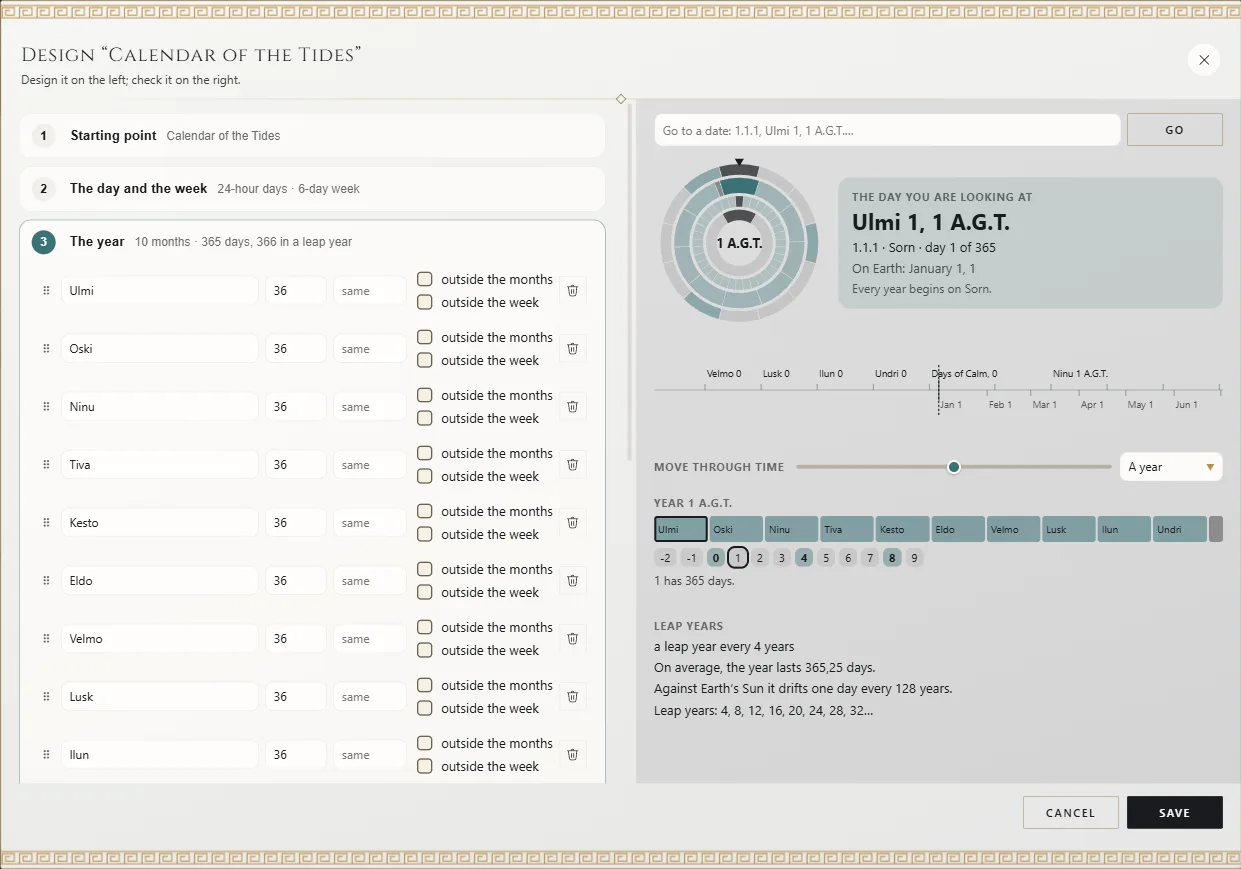
When you save, the whole calendar changes at once; if you change your mind, Ctrl+Z⌘Z puts it back the way it was.
In “The Isles of Selwen”, the Calendar of the Tides has ten months of 36 days, five Days of Calm outside the months (six every four years) and six-day weeks.
Write dates
Write from largest to smallest, separated by periods: 212 is a year, 212.5 the fifth month and
212.5.1 its first day. You can also write the name of the month or the date the way you'd say
it, like “Kesto 1, 212”. Whenever you write a date, Exaratio shows you how it understands it.
Relate two calendars
If your story uses two calendars, tell Exaratio a day you know in both, like “the day of the coronation”. With it, Exaratio can overlay the timelines in the chronology and tell you what date it is in each calendar.
- While designing it: in the Does it share time with another calendar? step, choose Linked and enter that day in both calendars. When you save, the calendar is positioned so they match.
- From the map of time: a calendar that stands on its own appears as an island; click Join to join it to another.
- With an anchor: Create an anchor does the same from the The work's time dialog.
Take a calendar to another work
On the calendar's sheet, click Export: out comes a .xrtm file you can share, with the
license you choose, or even keep private, so that only your account can open it. It carries its year and its
notation, not its link to your work.
The .xrtm is signed with your account, so you need Exaratio activated on the computer you export it from.
In the other work, click Import from a work or a .xrtm, or double-click the .xrtm and Exaratio offers
to import it into the open work. Only signed .xrtm calendars can be imported: that way you know who
they belong to and that nobody changed them along the way.
Exaratio 0.9 · revision 3 · October 17, 2026