

Create your world's calendar
An assistant asks what you know about your world, step by step, and does the maths.
Cette réponse n’est pas encore dans votre langue.
- In The work's time, choose In an invented world.
- Answer each step: The day, The year, Its parts, The week, How they count, Earth and Summary.
- Click Create calendar.
Its timeline is created on its own, with the world's name. Beside the questions you always see the result, compared with Earth.
The day and the year
What they call the day and how long it lasts, in our hours and minutes. Then how long their year is, in their days or in Earth time ("1 year and 3 months of ours"). If it isn't a whole number of days, Exaratio suggests leap years and tells you how far each suggestion would drift.
The parts of the year
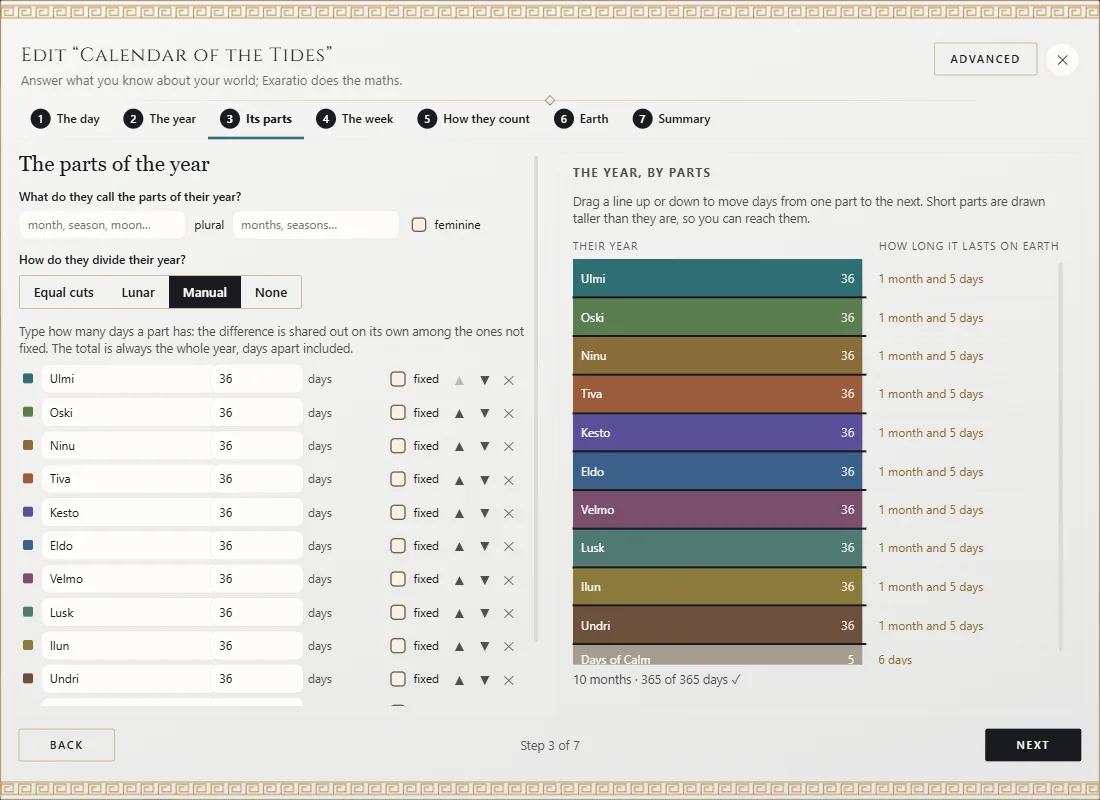
Equal cuts, Lunar (you say how long its moon lasts), Manual or None. By hand, the total is always the whole year: type one part's days and the difference is shared among the others. Tick fixed on the ones you don't want changed, and add days that belong to no part with Add days apart. On the right, drag the line between two parts to move days from one to the other.
The week
Each day's name (Add a day, the arrows and the cross) and when it starts: Runs on, Restarts each year or Restarts each part.
How years are counted
From which event they count and how they say a year. Each way comes with two sample dates.
Change it later
Click Edit on its card: the assistant opens with what you chose and ends with Save changes. The whole calendar changes at once; Ctrl+Z⌘Z puts it back.
An example
"The Isles of Selwen" is dated on Earth, between 1912 and 1918, but the islanders count with their Calendar of the Tides: ten months of 36 days, five Days of Calm outside the months (six every four years) and six-day weeks.
Exaratio 0.9 · révision 1 · 28 octobre 2026