

Continuity warnings and how to resolve them
Exaratio compares what you've noted down about your world and warns you when something doesn't fit. Here's how to decide what to do with each warning. · 5 min read
Exaratio keeps an eye on what you've noted down about your world: when each sheet exists, its relationships, who is in each scene, who knows what and where you name each one in the text. When something doesn't fit, it warns you. You decide whether it's a mistake or what you meant.
Where to see the warnings
- Choose Review → Warnings, or Review → Continuity warnings. They open in the chronology.
- In the chronology, the notice in the top bar tells you how many things there are to look at. Click it to open them.
- While you write, in In the scene, you see the ones for the scene you're in.
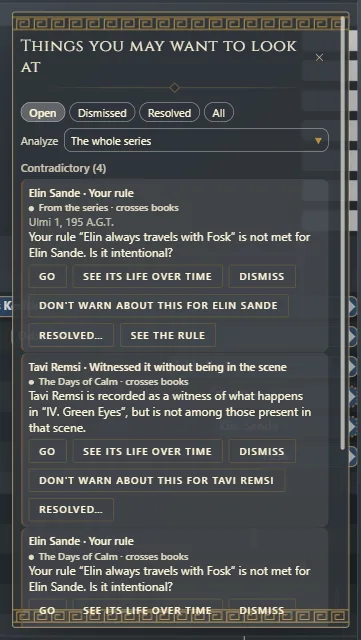
What it can warn you about
Warnings come in two groups.
Contradictory: two things you noted down can't both be true.
- Mentioned before existing and Mentioned after the end: the text links to someone at a moment when they don't exist yet or no longer exist.
- Ends before it starts and Validity outside the line: a sheet's dates don't add up.
- Point of view outside its lifetime and Place outside its existence: the scene is told from someone, or takes place somewhere, that doesn't exist at that moment.
- Witnessed it without being in the scene, Was there and finds out later and Knows it before it is true: what a character knows doesn't fit with where they were or with when it happened (Who knows what, and since when).
- Your rule: a rule you declared for your world isn't met, such as “Elin always travels with Fosk” (your world's rules).
Not yet told: a piece of information is missing to be sure.
- Link with no overlap: two sheets have a relationship, but they never overlap in time.
- Mentioned without being placed: the text mentions it, but you haven't given it dates.
- Named before existing and Named after its end: the text names it outside its time, even though you didn't link it.
- Yet to be revealed: a fact you marked to be revealed that isn't told anywhere yet.
What to do with each warning
Each warning comes with its buttons:
- Go: takes you to the text or the sheet that causes it, even if it's in another book of the series.
- See its life over time: shows you in the chronology when that sheet exists.
- Dismiss: if it's intentional. It stops warning you about this.
- The button that starts with “Don't warn about this for…” no longer warns you about that for that sheet.
- Resolved: if you've already fixed it. You can leave a note of what you did. If the warning shows up again with different details, it reopens on its own and tells you.
- See the rule: on the warnings from one of your rules, opens that rule so you can correct it.
While you write, in In the scene, the equivalent button is It's intentional.
Your decisions are saved with the work. Above the list you choose what to see: Open, Dismissed, Resolved or All. On the ones you've already decided, Note changes your note and Warn again makes it warn you again.
When you fix what caused the warning, it goes away on its own.
Your world's rules
A rule says something that always holds in your world, or that cannot happen. If the story breaks it, you get a warning. To see and write them, choose Review → Rules, or Review → Your world’s rules.
- Click New rule.
- Give it a name and choose what it says: Only exists between two dates, Never coincide or Does not exist without the other.
- Choose which sheet it's about and, depending on the shape, the dates or the other sheet. Click OK.
If a rule stops being useful to you for a while, click Turn off: it doesn't warn, but you don't lose it. Creating, changing or deleting a rule can be undone with Ctrl+Z⌘Z, like any other change to the work.
An example: Tavi wasn't at the dock
In “The Isles of Selwen,” Exaratio warns: Tavi Remsi is recorded as a witness of what happens in “IV. Green Eyes”, but is not among those present in that scene. There are two ways to fix it, depending on what you want to tell:
- Tavi wasn't there: he found out later, when Elin tells him. In “Who knows what,” change how Tavi knows it to “was told,” starting from the next scene (Who knows what, and since when).
- Tavi was there: on the dock scene's sheet, add him to the people present (Chapters, parts and documents: organizing the work).
Either way, the warning goes away.
In a series
If the work has several books (A series: several books in one work), the warnings look at the whole series. Above the list, in Analyze, choose The whole series or a single book. Each warning says which book it comes from, and whether it mixes information from more than one.
Exaratio doesn't read the meaning of your prose: it compares the data. To have someone read the text and look for contradictions, such as an eye color that changes, ask your assistant for a review (Ask for a review: continuity, chronology and style).
Exaratio 0.9 · revision 2 · October 17, 2026