

Read your work as your reader will
Your work as a book, with spoiler-free cards, to check it reveals each thing on time.
Esta resposta ainda não está no seu idioma.
- Press F5F5.
- Click Start reading, or Continue reading if you've started.
- Move on with the arrows, Space or Page Down. Esc takes you back to writing where you were.
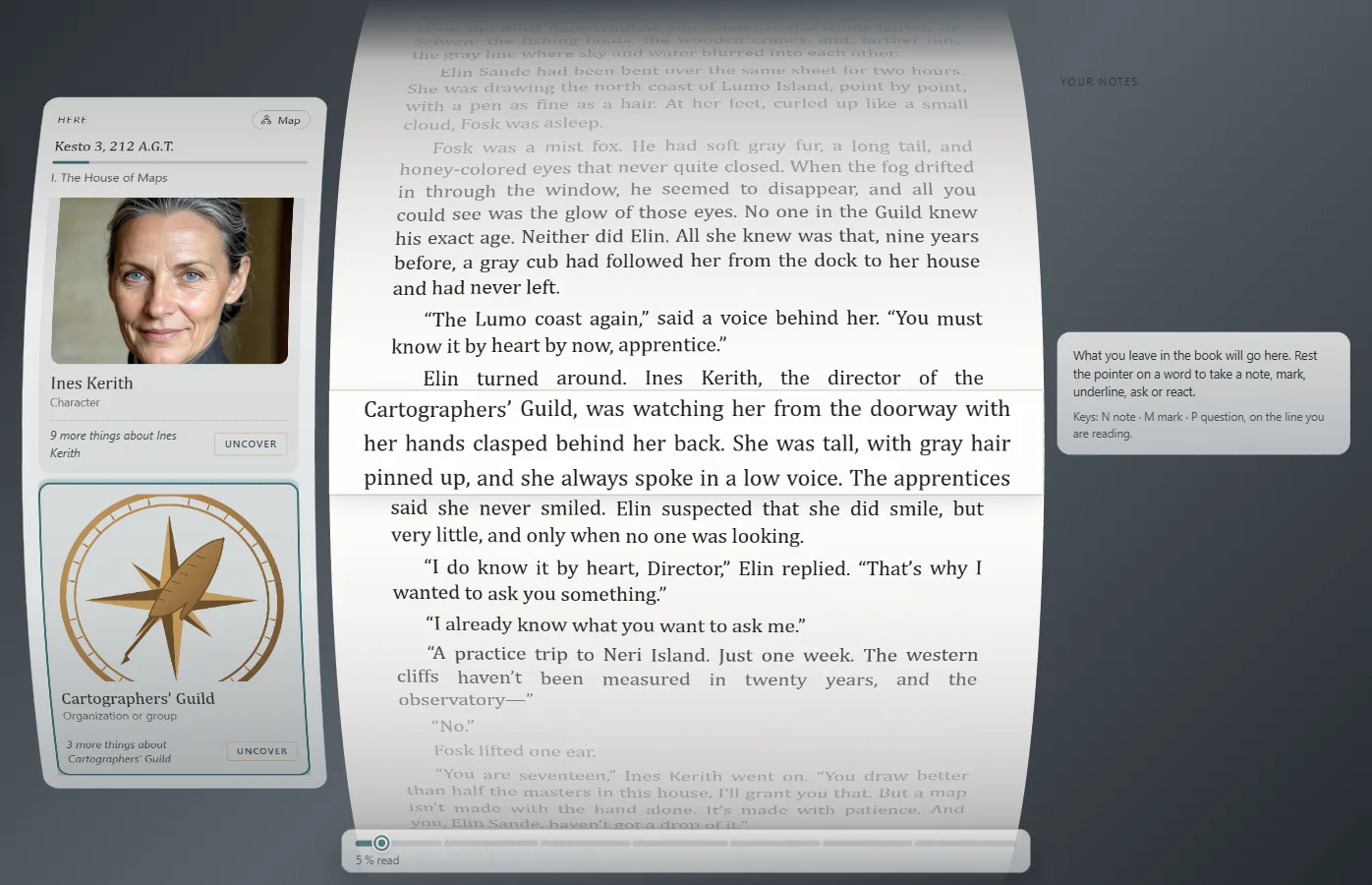
Settings and contents
In Settings: font size, line width, the page's Curvature and how the line you're reading is marked. Contents lists the chapters; Back to my reading goes back to where you were. In a series, Book picks the book. Ctrl+Home and Ctrl+End go to the start and end.
Who's here
Here shows who appears in what you're reading. Cards show only what the reader has already read; the rest stays under To uncover, and you see it only if you click Uncover. That way you check your book reveals each thing at its moment (Mark what a passage reveals).
Your reading notes
Pause on a word to Take a note, Mark, Underline, leave a Question or a Reaction. It all stays in Your notes. They stay on this computer and don't change the work.
What your readers can do
Whoever receives your work reads it with Exaratio, free and without a license, with everything you see here.
Exaratio 0.9 · revisão 1 · 28 de outubro de 2026