

See continuity warnings
Exaratio compares what you've noted about your world and warns you when something doesn't fit.
Cette réponse n’est pas encore dans votre langue.
- Review → Warnings.
They open in the chronology. You decide whether each one is a mistake or intended.
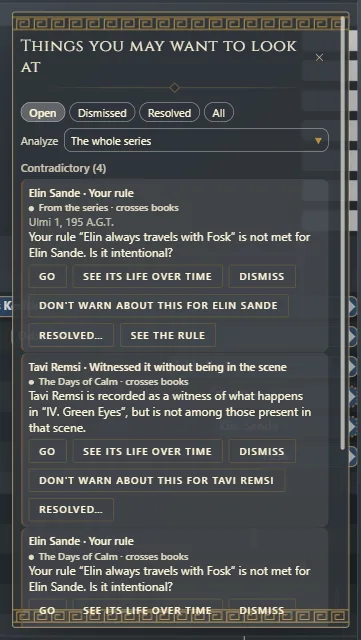
Other places you see them
- In the chronology, the notice on the top bar says how many things need a look; click it to open them.
- While writing, in In the scene, the ones for the scene you're in.
Contradictions
Contradictory: two things you noted can't both be true.
- Mentioned before existing and Mentioned after the end.
- Ends before it starts and Validity outside the line.
- Point of view outside its lifetime and Place outside its existence.
- Witnessed it without being in the scene, Was there and finds out later and Knows it before it is true (Who knows what, and since when).
- Your rule (Your world's rules).
Gaps
Not yet told: a detail is missing to be sure.
- Link with no overlap.
- Mentioned without being placed.
- Named before existing and Named after its end.
- Yet to be revealed.
In a series
Warnings look at the whole series. Under Analyze, choose The whole series or a single book; each warning says which book it comes from. With one book, you see the ones for the timeline chosen in the chronology.
What it doesn't see
Exaratio doesn't read the meaning of your prose: it compares data. To have someone read the text looking for contradictions, like eye color that changes, ask your assistant for a review (Ask it for a review).
Exaratio 0.9 · révision 1 · 28 octobre 2026