

Read your work as your reader will
Reading mode shows you your book the way your reader will experience it, with character sheets that don't give away what's coming, and your reading notes. · 3 min read
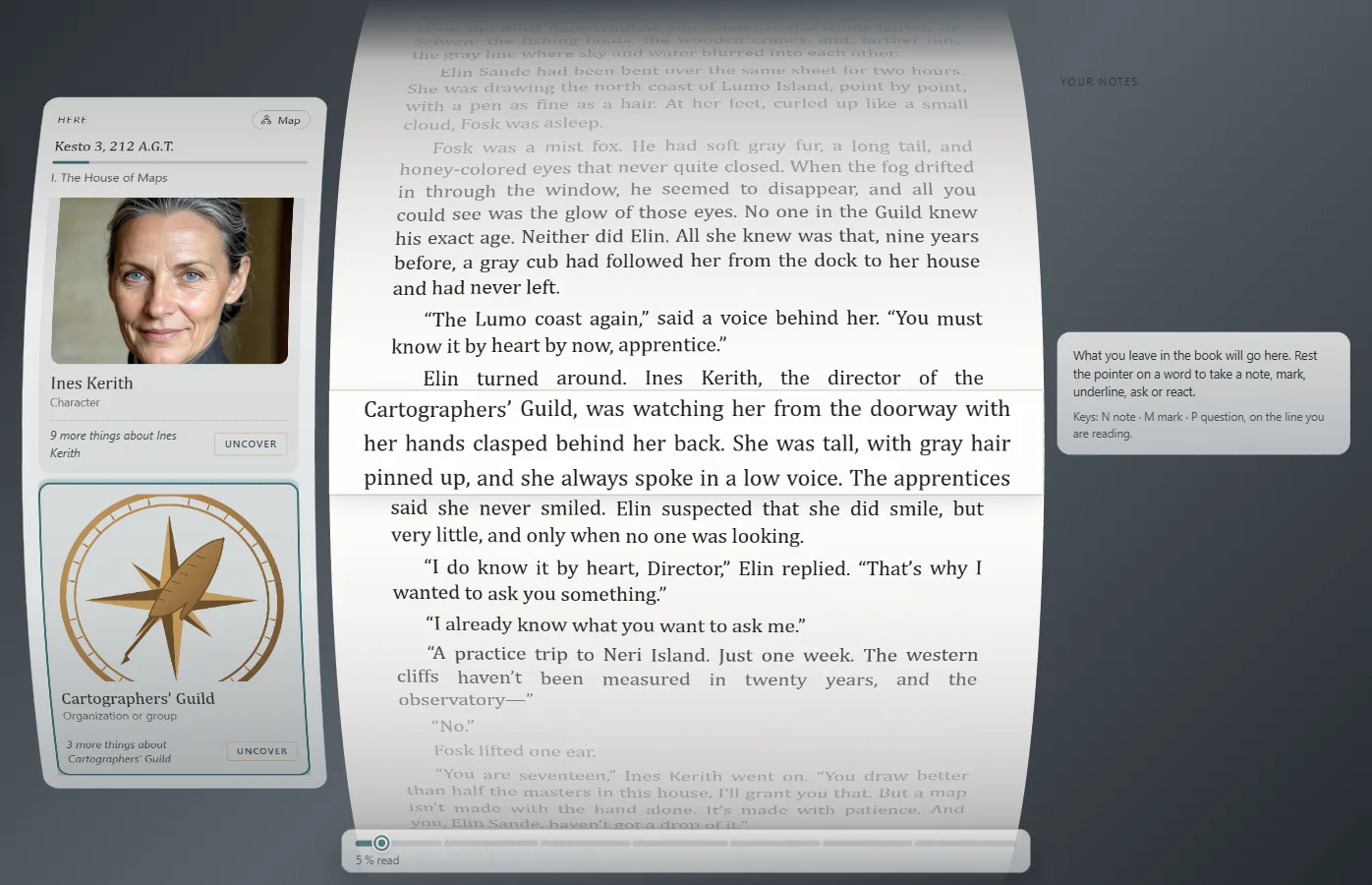
Press F5F5 or choose View → Read the work. Your work appears as a book, with its cover (The cover and the title page), and Exaratio remembers where you left off.
Read
Click Start reading or, if you've already started, Continue reading: the book opens and leaves you on the page. Move forward with the arrow keys, Space or Page Down; the line you're reading always stays highlighted. Ctrl+Home and Ctrl+End take you to the beginning and the end.
In Settings you adjust the text size, the line width, the page's Curvature and how the line you're reading is highlighted. Your reading tells you how far along you are and how you've read it.
Go to a chapter
Click Contents, next to Settings: you see the chapters in order; what you've already read appears fainter and where you are is marked. Choose one to take a look at it; with Back to my reading you go back to where you were, without losing your reading. In a series, Book lets you choose which book you read.
Who is here
On the left, Here shows who appears in what you're reading, with their portrait. Click one to see their sheet, and Map to see who has appeared so far and how they're related.
The sheets don't give anything away: they show only what the reader has already read. The rest stays under To uncover, and you see it only if you click Uncover. This way you check that your book reveals each thing at the right moment.
Your reading notes
Rest the pointer on a word, or double-click it, to Take a note, Mark, Underline, or leave a Question or a Reaction. With Meaning you see what it means (it needs an internet connection).
Everything goes into Your notes, on the right, where you can go back to each passage. Your reading notes stay on this computer and don't change the work.
Exit
Press Esc or F5F5: you're back to writing where you were.
What your readers can do
Whoever receives your work reads it with Exaratio, free and without a license, with everything you see here: the book that opens, the page settings, the sheets with no spoilers, the meanings, their notes and what they felt, the numbers of their reading and, if you want it, the rating when they finish it. The help for reading explains it step by step: start with Read a work with Exaratio, and see how to open your work to ratings in Rate a work, anonymously.
Exaratio 0.9 · revision 3 · October 17, 2026