

Export your book
PDF, EPUB, Kindle, Word, RTF or Markdown, composed by Exaratio with no external programs.
Diese Antwort gibt es noch nicht in Ihrer Sprache.
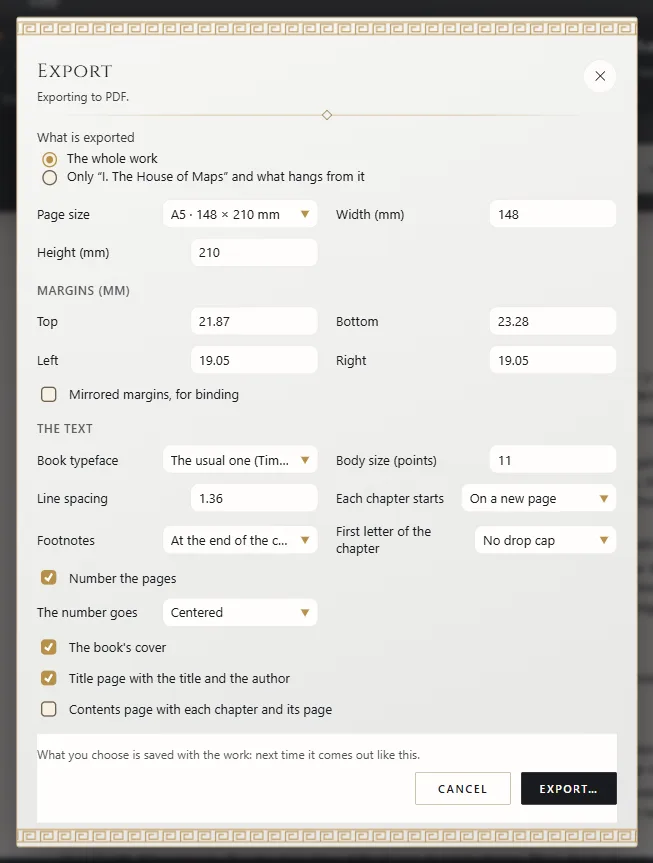
- Work → Publish: PDF, EPUB or Word.
- Choose whether to export The whole work or just the open document, adjust the options and click Export.
- Choose where to save it.
Exaratio remembers each book's options.
Other formats
Under File → Export there are also Kindle (AZW3 and MOBI), RTF, Markdown and Print cover (.pdf).
The font
Your book comes out as you see it: the work's base font and whatever each passage has. The font, size and spacing in the export dialog let one format come out differently (The work's base font).
What goes in the book
The work in manuscript order, with its images and footnotes. Drafts and the workshop are left out; your annotations are always private. The cover opens the book and, in PDF and EPUB, the back cover closes it. The title, your name, the ISBN and the other details go inside.
The credits page
Credits page, with the seal's QR code if the edition has one. It comes on its own when exporting an edition; in a working copy it's a checkbox.
Who can export
Only a work's owner exports or prints it; whoever receives it reads it. What you export no longer has Exaratio's protection: think about who gets it (How a work is protected).
Exaratio 0.9 · Revision 1 · 28. Oktober 2026