

Take notes, mark, underline and ask
Leave your notes, marks, underlines and theories in the book. They're yours: they stay on your computer and the author doesn't see them. · 2 min read
Rest the pointer on a word (or double-click it) and choose in the capsule what to leave at that spot. With the keyboard it's faster: N for a note, M for a mark and P for a question, on the line you're reading.
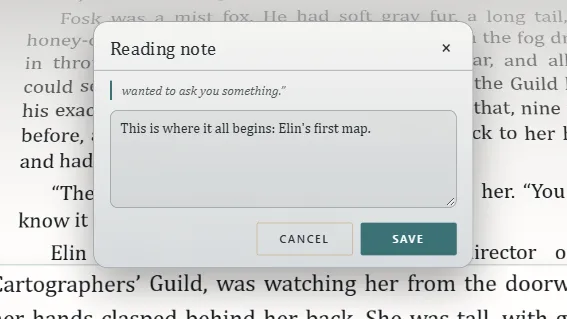
What you can leave
- Take a note: a Reading note, with whatever you want to remember about that spot.
- Mark: a named spot to come back to. At first it carries the chapter's title; change it if you like.
- Underline: underlines the whole sentence in Yellow, Green, Blue or Pink, with a comment if you like.
- Question: a doubt or a theory about what will happen. When the book answers it, click Resolved here on that page, and then say whether you got it right.
- Reaction: what that passage made you feel (What it made you feel).
Your notes
Everything you leave appears in Your notes, on the right, next to its line. At the top you choose what's shown —Notes, Marks, Underlines, Questions, Reactions—, and each one has Go to the text, Edit and Remove.
When you go to a distant note, Back to my reading takes you back to where you were reading.
They're yours
Your notes stay on your computer, protected, and don't change the work. Its author never sees them: they belong to your reading, not to the book.
In Your reading you'll see them all together (Your reading, in numbers). To take them with you, click Copy my notes there: it copies everything you wrote —never the book's text— so you can paste it wherever you like.
Exaratio 0.9 · revision 1 · October 17, 2026