

Characters, places, objects and organizations
Create the entities in your story, from the panel or straight from the text, and check their sheet while you write. · 2 min read
Entities are what lives in your story: characters, places, objects, organizations, plots, events, the rules of your world and facts. Exaratio recognizes their names in the text and shows you their sheet while you write.
Create an entity
- Click Review → New entity, or + in the entities panel.
- Type the Name and choose the Type: Character, Place, Object, Organization or group…
- If you like, choose its Category (Your own categories) and add a Description and its Alias (Aliases: one character, many names).
- Click OK.
From then on, every time you type its name, Exaratio recognizes it and underlines it.
From the text
Already typed the name? Select it and choose Review → Create from selection, or right-click → Create an entity and associate it. The name is already filled in: just choose the type and click OK.
The entities panel
Press Ctrl+E⌘E or the Entities button on the right rail. The panel follows the cursor: when you pass over a character's name, it shows their sheet (The context panel while you write).
To see them all, click All entities. They're grouped by category (Your own categories), each with its portrait if it has one. Type in Search entities or categories to find one by its name or by one of its aliases: it doesn't matter whether you type the accents or not, and if it finds it by an alias, it tells you which one.
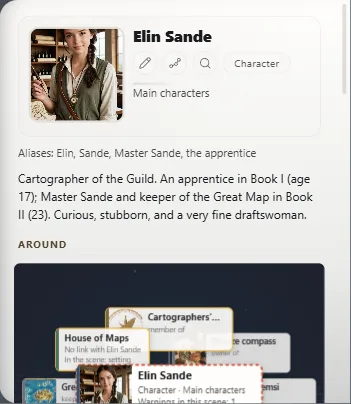
At the top of the sheet you have:
- Edit (the pencil): name, type, category, description, aliases, properties and images.
- Find next occurrence in the text: takes you to the next place it appears in the work, even if it's in another chapter.
- See its life over time: its story across the timeline.
Delete an entity
Right-click it in the list and choose Delete entity. Before deleting it, Exaratio tells you how many times you associated it in the text. Your text doesn't change: only the sheet, its associations and its relationships go away.
Exaratio 0.9 · revision 2 · October 17, 2026