

Your own categories
Group your entities your way, for example by family, by island or by faction. · 1 min read
Categories are groups you make up: “The House of Maps”, “Harbor folk”, “The northern islands”. They organize the list of entities and help you group the map, the panorama and the timeline.
Create a category
Choose Context → New category, or right-click the list of entities → Create new category. Type its name and click OK.
Put entities in it
- When you create an entity, choose its Category in the same dialog. If you create it by right-clicking the category → Create entity here, it starts out inside it.
- One that already exists: open its sheet, click Edit (the pencil) and change its Category.
- Faster: in the list of entities, drag it to another category and drop it there. If you drop it on No category, it's left without any.
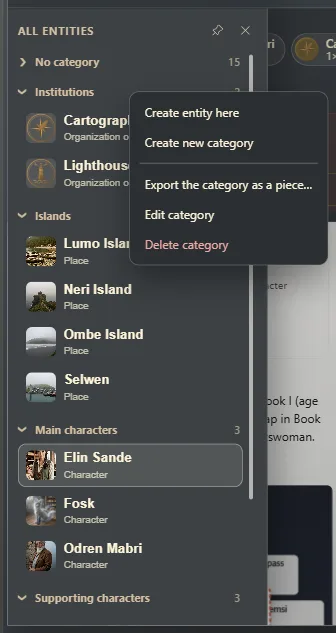
Rename or delete
Right-click the category:
- Edit category changes its name.
- Delete category removes it. Its entities aren't deleted: they move to No category.
Where else they're used
- In the relationship map, Group → by category (Relationships between entities).
- In the panel's Panorama mode (The context panel while you write).
- In the timeline, to see only the events of one category.
Exaratio 0.9 · revision 2 · October 17, 2026