

The work's presentation and its book
Before you read, Exaratio presents the work and its book in 3D. When you start, the book opens and its first leaf becomes your page. · 2 min read
When you open a work, Exaratio prepares it and presents it to you: who wrote it, whether its signature is authentic, what rights it has and how it's made. Next to it is the book, with its cover, ready to open.
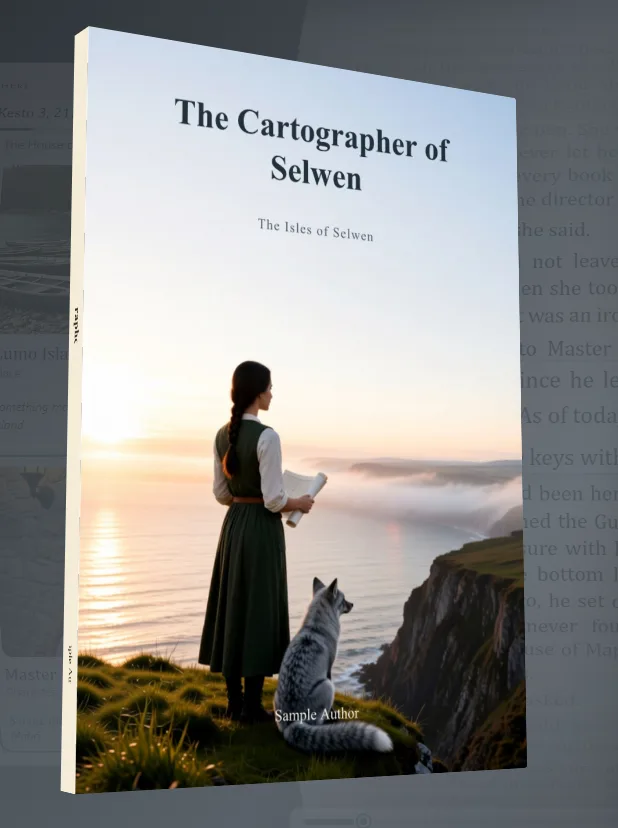
The book
The book appears in 3D: it arrives turning, shows its spine and its back cover, and settles at three quarters, breathing slowly, while you read the presentation. You don't need to touch it: it's the cover just as its author designed it, and it shows itself. Whatever the author didn't design takes the color of the paper.
Click Start reading —or Continue reading, if you had already started it—. The book turns to face you, the cover opens and its first leaf grows until it fills the exact place of the page you're going to read, with the same curve and the same light: the book you had in front of you becomes your reading, without a break. If you were reading it, that leaf already carries the lines where you left off.
If the author gave the work its own paper, the first page is made of that paper from the moment the cover opens: its texture, its edges and its marks, exactly where they will be on your page (Visual styles).
What the presentation tells you
- The title and its author, or "Anonymous work" if the author preferred not to be named. What someone wanted anonymous isn't shown.
- The signature: if it says Signed, Exaratio checked that the work belongs to who it says and that no one has touched it since it was signed. If it says Signature doesn't match, the file was changed outside Exaratio.
- Rights: Protected means all rights reserved: it's read here, and copying or distributing it is up to its author. Free means its author made it free, with the license shown.
- Who made it, the Images with their credits, the Typefaces, the Bibliography and some Technical details: how many words, documents and images it has, and when it was saved.
To learn how Exaratio protects works, see How a work is protected.
Exaratio 0.9 · revision 2 · October 17, 2026