

Set the page the way you like
Font size, line width, the sheet's curve and how much it dims around.
यह उत्तर अभी आपकी भाषा में नहीं है।
- Move the mouse and click Settings, in the corner capsule.
- Adjust and see the result at once.
What you choose applies to every work you read.
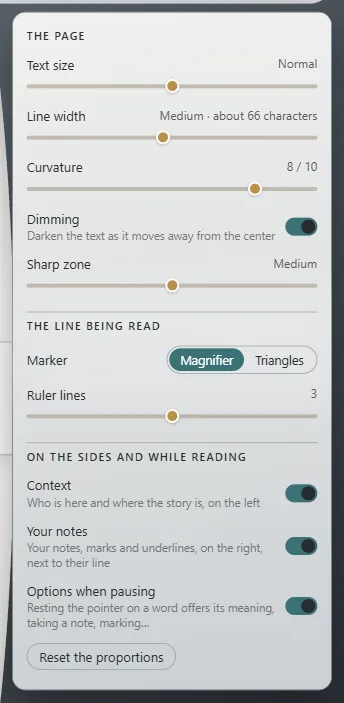
The sheet
- Text size: five steps, from Smaller to Larger.
- Line width: how many characters fit on each line. Between 55 and 75 reads comfortably.
- Curvature: the sheet is rolled like a drum; all the way left it's Flat.
- Dimming: dims text further from your line; the Sharp zone decides how much stays undimmed: Narrow, Medium or Wide.
- Read on my paper: if the work brings its paper, read it on your computer's. It only shows in works with paper.
Width of the sheet and sides
Drag the handle that appears on its edge; double-click to restore it. Reset the proportions puts them all back.
Colors
Those of Exaratio's visual style: View → Editor theme.
Exaratio 0.9 · संशोधन 1 · 28 अक्तूबर 2026