

The image library
All the work's images, with their credit, where they're used and their size.
Diese Antwort gibt es noch nicht in Ihrer Sprache.
- Insert → Library.
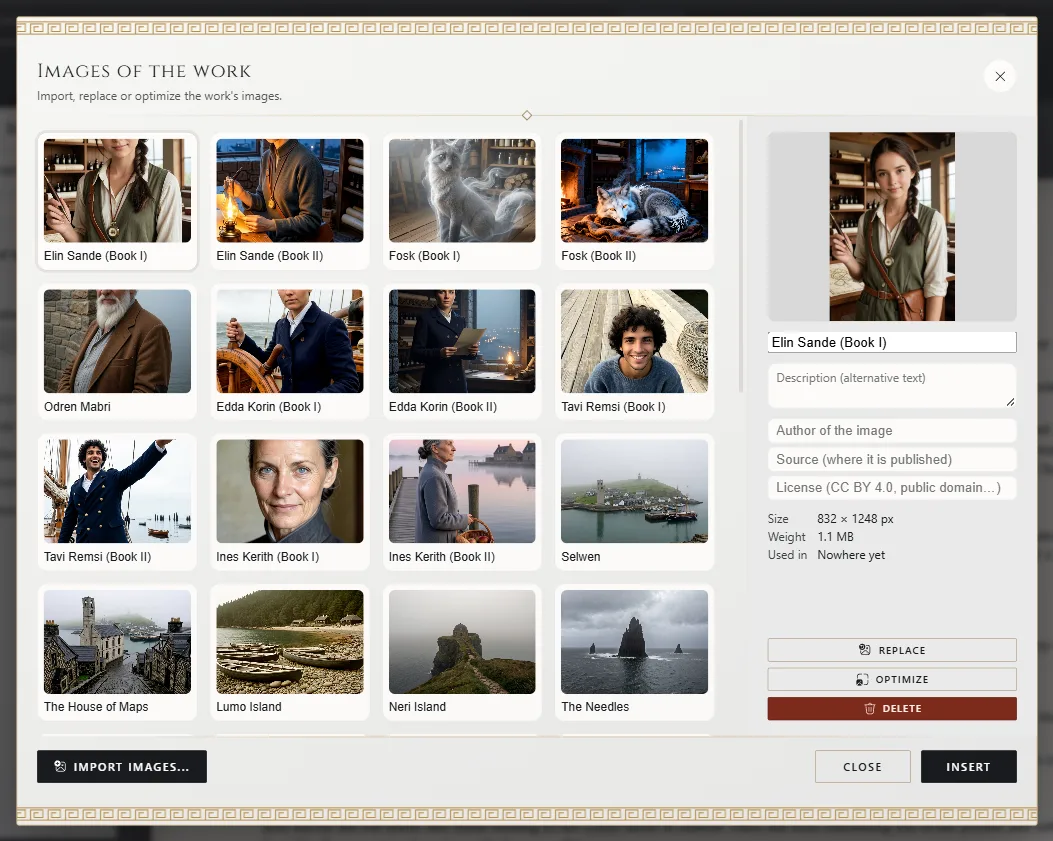
Images of the work opens.
One image, once
All images live in the library, inside the .exar file. An image used ten times takes up the space of one.
Character portraits and the cover use the same library.
Its details
For each image you note its name, description and credit: who made it, where it's from and its license. Used in says which chapters it appears in. Import images brings images from your computer.
Change it everywhere
Replace swaps the image everywhere it's used, without touching its caption or size.
Reduce its size
Choose the image, click Optimize and pick a level: Balanced, Compact or Minimal. Before accepting you see how much it weighs now and how much it will.
Delete it
Delete removes it from the whole work: every chapter and every card that uses it. It asks you to confirm, and Ctrl+Z⌘Z puts it back everywhere at once.
Exaratio 0.9 · Revision 1 · 28. Oktober 2026