

Connect your AI assistant to Exaratio
Connect Claude, Codex, OpenCode or another AI assistant to your works so it can import, organize and review with you, using your own account. · 3 min read
Exaratio doesn't come with its own AI: it works with yours. Connect your assistant, such as Claude, Codex or OpenCode, and it can read your work, create sheets, date scenes or check continuity, always with your account and on your computer. Exaratio doesn't send your writing anywhere.
Any assistant that supports MCP will do. MCP is the system assistants use to connect to other programs.
1. Create a token
A token is the key you give your assistant so it can make changes to your works.
- In Exaratio, choose Tools → AI agents (MCP).
- Type a Token name, for example “Claude on my laptop”.
- Click Create token. The token's details open below, with what you need to connect it.
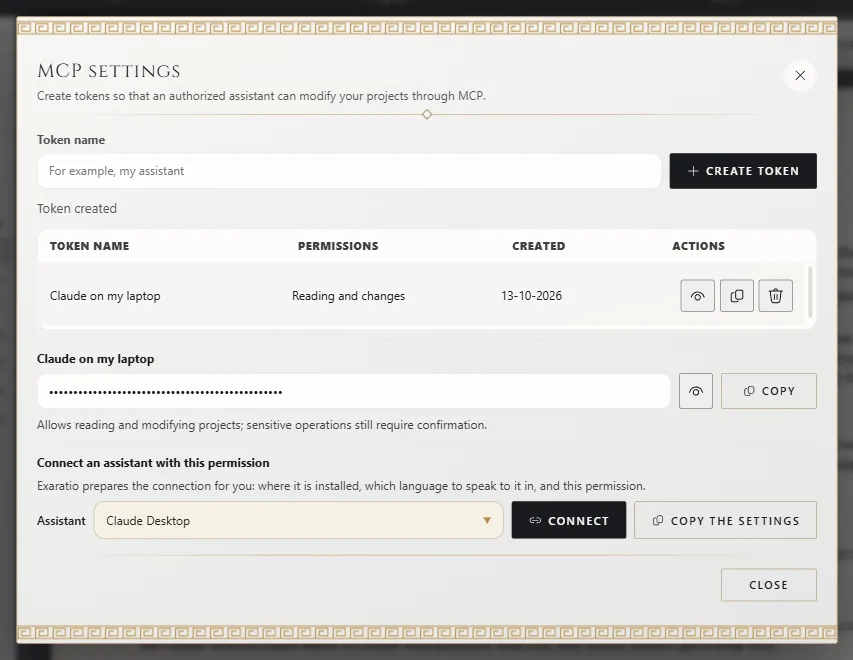
You can come back to this window whenever you like: click View details next to the token to open them again.
2. Connect it
You don't need to write any configuration: Exaratio knows where it's installed, which language to use with your assistant and which token to use.
- In the token's details, choose your assistant under Assistant: Claude Desktop, Claude Code, Codex, OpenCode, Cursor, Gemini CLI or Another assistant.
- Click Connect and confirm. Exaratio adds its connection to that assistant's configuration without touching anything else, and first saves a backup copy next to it.
- Quit your assistant completely (also from the system tray, if it stays there) and open it again.
If you'd rather do it yourself, or your assistant is on another computer, Copy the settings gives you the configuration ready to paste, in the format that assistant understands.
3. Try it
Ask your assistant: “Which Exaratio works do I have?” It will tell you which ones your computer knows about. From then on, refer to a work by its title.
Remove its access
In AI agents (MCP), click Delete token next to the token and confirm. From that moment on, the assistant that used it can no longer change your works.
Exaratio 0.9 · revision 3 · October 17, 2026